
36 Hours with Fable
Full transcript and code from a highly complex implementation

What a week, huh? First Anthropic gives us the most powerful model ever released, then the US government takes it away. While reflecting on how wild the whole situation is, it occurred to me that I’m in a somewhat unusual situation: during the few days it was available, I used Fable extensively on a highly complex, open source, non-commercial project that I work on primarily for my own satisfaction.
I think this is unusual because many of the people who got to try Fable during its brief window of availability likely did so within a work context, with proprietary code that can’t be shared. That means that many of the online discussions about it tend to devolve to unsubstantiated opinions, with the only hard examples shown being the usual one-shot vibe-coded toys that have been achievable since Opus 4 or earlier.
Because I had it work on an unusually complex problem (at least for shareable, open source, non-commercial code), plus full control over the resulting artifacts, I thought it might be interesting to document what the experience was like.
To really understand the complexity of the work will take some backstory and setup, but if you just want to read the session transcript, you can see that here (warning, large), and if you just want to see the commits containing all the work done, you can see those here and here.
What it did, short version
TL; DR: it finished my half-done implementation of a node-editor framework (called lightweaver), designed for dynamic real-time visualization and texture synthesis. If you’re familiar with TouchDesigner, it’s similar to that, but built with the Unity game engine.
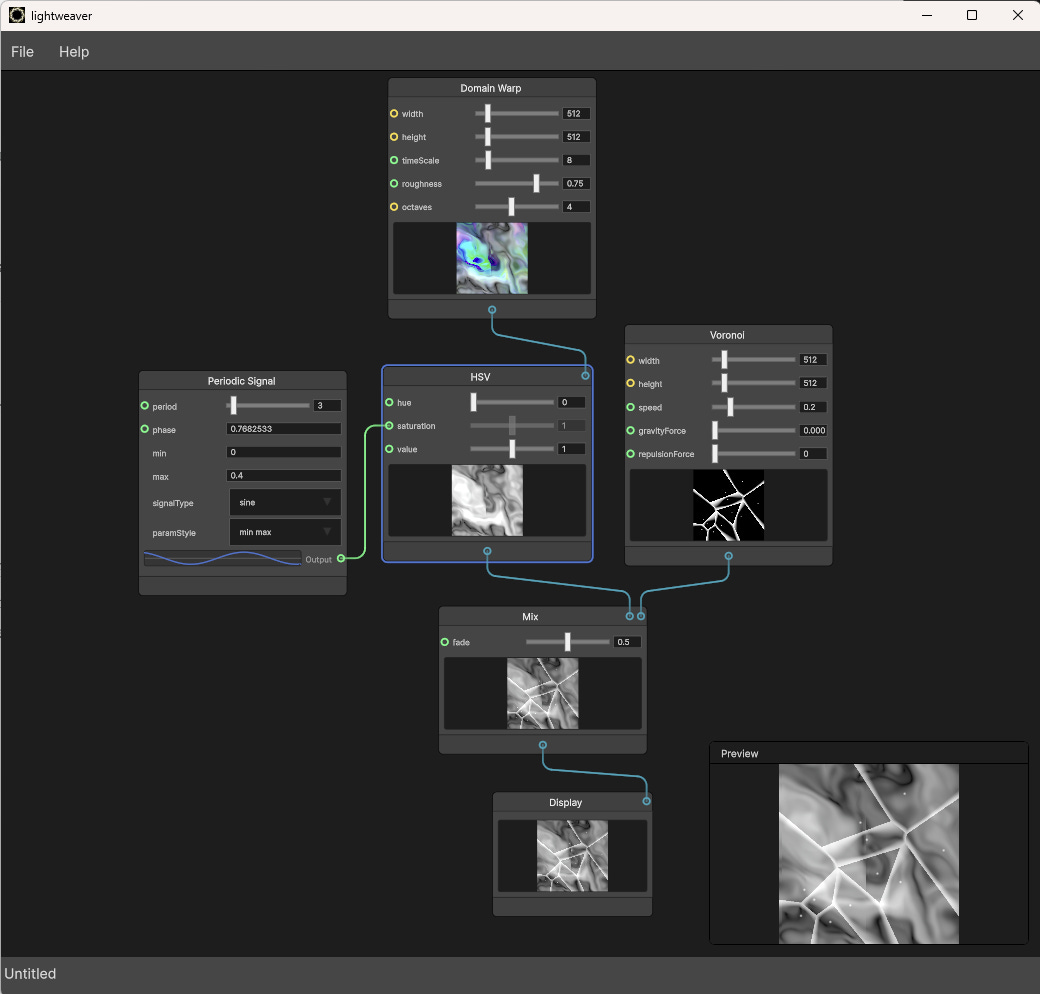
The running lightweaver application
But what does that mean, and why is it complicated? I’m so glad you asked! To fully answer, first we need some history.
Origins
Since 2017, I’ve been working on a large art installation called The Canopy. It’s a radial array of LED strips, with, as of last count1, over 14,000 individually addressable LEDs. The original software was written in Processing, a requirement of the LED control hardware we used (a set of Pixelpushers from the now-defunct heroicrobotics). Our experience there was that while the installation was awesome, the framerate was not where we wanted it.

The Canopy circa 2017, with pattern in Processing by ai.see.things
One of the areas we thought might be contributing to the slowness was the use of Processing to generate patterns. Processing is essentially a flavor of Java, and runs on the CPU. At the time, I was working with Unity for VR development, and thought that moving pattern generation into shaders (and thus leveraging the parallel power of the GPU) might help. So in 2018, I made a relatively simple Unity app that let you click-select from a few shader-based patterns, and then shipped the resulting pixel data over the network to a Java server2 written by another contributor (Jeff) which could call the Processing library to send the data to the LEDs.
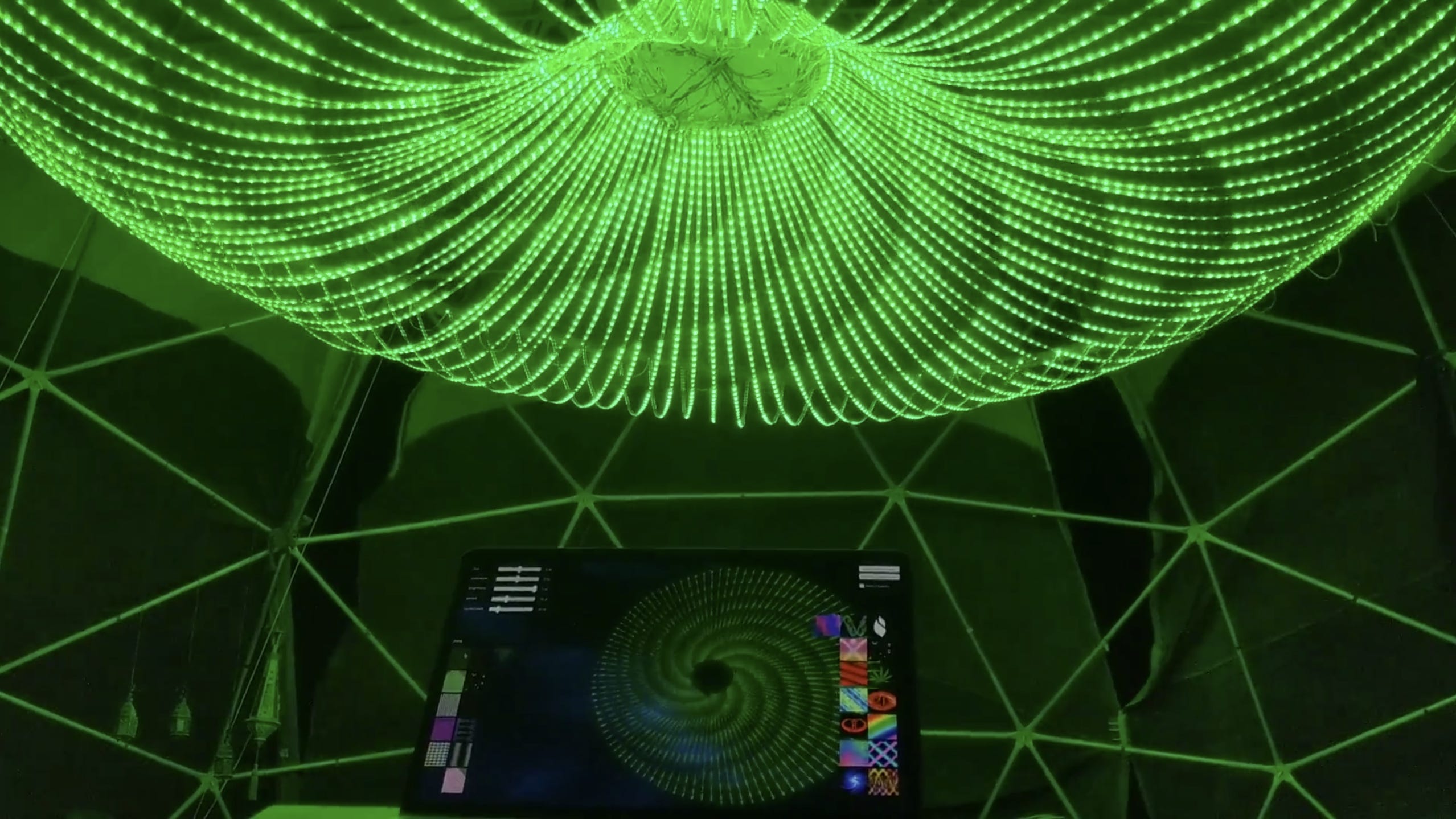
The Canopy circa 2018 with patterns from canopy-unity, by me
These shader patterns had very simple scrubbable parameters (or uniforms, in *GL terminology), visible in the top left of the photo above. However, while working on it, I found myself wanting the ability to pass more complex data as inputs, to create more variation in the patterns. I was eventually able to get a pattern to take the output of another pattern as input, but it was not a very robust UX - you’d select a single pattern, then select another, establishing a link, but it was hard to know post-facto you’d done so, you couldn’t create more complex chains, etc.
Eventually I realized that what I actually wanted was fully generalized input-output data flow, where numeric data could be sent into one pattern, whose output could be sent to another (or multiple others) as input, and the results of that could then be sent on to another, ad infinitum. Or at least ad a-good-number-um. This desire led me inevitably to the concept of a node editor.
Node editors
To review, node editors are a UI paradigm common in creative and visual domains where rapid reconfigurability and exploration is desirable. They allow the user to create and connect nodes on a canvas, with each node representing some operation, like “warp this texture’s UV map” or “load audio data from a file”. Data flows between nodes, creating a directed acyclic graph of computation that can be easily modified at runtime. Blender geometry nodes, Unreal Blueprints, Comfy UI, etc, all implement this pattern.
If you’re familiar with this space, you’re probably thinking, “So why didn’t you just use TouchDesigner?” The embarrassing answer is simply that at the time, I’d never heard of it. If I could go back and start over using it, I probably would, but hey, here we are. I was working with Unity a lot, it was what I knew, and I’d seen node editors in game-engine contexts before (ie Unreal Blueprints), so it made some sense in my head to just extend the thing I had written with a new UI paradigm that would let me plug my shaders into each other. Thus were many costs sunk.
I found an open source framework for creating node editors in Unity called, appropriately, NodeEditorFramework by Seneral, and with some concerted effort, was able to build a set of visualization primitives on it, that would let patterns flow between nodes in the form of RenderTextures. I could also then take numeric inputs (I called them Signals) and chain them together, and settled on a schema where signals flowed left-to-right, and textures flowed top-to-bottom, independently re-deriving TouchDesigner’s CHOPs & TOPs. I called it canopy-unity, since it was software to power the Canopy, and it was built with unity.
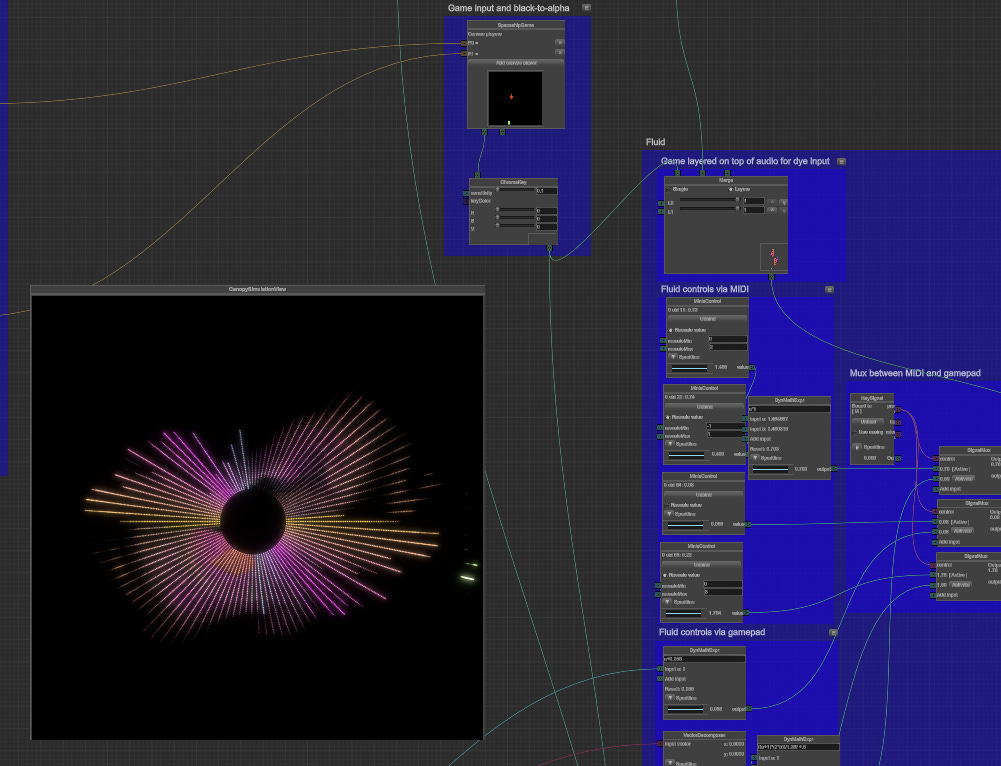
The canopy-unity application as it looks today
This was, overall, great - it unlocked all kinds of fun new ways to create and control patterns, like taking MIDI input from a physical controller, and using it to drive a shader parameter, or filters that could adjust the HSV levels of a texture before passing it on to a panning node that could move the texture around3, mirror it, etc. One particular setup I’ve gotten a lot of mileage out of is controlling a fluid simulation’s time step parameter with a MIDI knob, which yields a fluid that seems to pulse and move in sync with your twists.
However, there were some serious downsides, that would become more and more apparent over time.
The issues
IMGUI
For one, the framework was built with IMGUI, an immediate mode GUI library that re-renders the contents of every node, widget, edge, text-box, etc, each frame. As more and more nodes show up on screen, the performance penalty keeps climbing until the framerate starts noticeably chugging. Scrolling the canvas feels choppy, especially in the Unity Editor, where there’s the editor performance penalty on top. And, as we’ll soon see, in the editor is the only place the whole thing really worked.
IMGUI is also a weird and frankly kind of nasty UI library to work with, with a highly imperative style, vs the more modern declarative style most UI designers are used to from eg the web. Defining a node’s UI looks something like this:
    public override void NodeGUI()
    {
        GUILayout.BeginVertical();
        textureInputKnob.SetPosition(20);

        GUILayout.BeginHorizontal();
        widthInputKnob.DisplayLayout();
        if (!widthInputKnob.connected())
        {
            width = RTEditorGUI.Slider(width, 1f, 1024f);
        }
        GUILayout.EndHorizontal();

        GUILayout.BeginHorizontal();
        heightInputKnob.DisplayLayout();
        if (!heightInputKnob.connected())
        {
            height = RTEditorGUI.Slider(height, 1f, 1024f);
        }
        GUILayout.EndHorizontal();

        GUILayout.BeginHorizontal();
        GUILayout.BeginVertical();
        GUILayout.Label("Edge wrap mode");
        RadioButtons(edgeWrapMode);
        GUILayout.EndVertical();
        GUILayout.BeginVertical();
        GUILayout.FlexibleSpace();
        GUILayout.Box(outputTex, GUILayout.MaxHeight(64), GUILayout.MaxWidth(64));
        GUILayout.EndVertical();
        GUILayout.EndHorizontal();
        textureOutputKnob.SetPosition(DefaultSize.x - 20);
        GUILayout.EndVertical();

        if (GUI.changed)
            NodeEditor.curNodeCanvas.OnNodeChange(this);
    }
Yuck. The nested Begin/End horizontal/vertical groups get confusing fast, and it’s overall quite difficult to make nice looking UI.
Unity themselves are now two frameworks beyond IMGUI, having first switched to Unity UI (a MonoBehaviour-based framework for runtime / in-game UI), and now UI Toolkit, a web-tech inspired subset of HTML/CSS designed for both in-editor custom tooling and in-game UI.
Serialization
A bigger issue was serialization. The framework was designed to work both within the Unity Editor itself (ie, for authoring assets used in games, like dialog trees), as well as at runtime, in a built application. This was quite unusual, since most game-engine node editors serve solely the first use case - you don’t typically need a node editor in an actual shipped game. This was important for me, since my use case actually was to create dynamic patterns in a runtime context.
The core issue was that serialization of the node canvases worked differently between runtime and in-editor contexts, and was fundamentally broken for the runtime context. In-editor, canvases were saved to Unity .asset files (which can be either “human-readable” yaml, or proprietary binary), using all of Unity’s built-in serialization magic. At runtime, canvases were instead serialized to XML, using C# System libraries. Unfortunately, that serialization step would fail for certain types of user-defined nodes.
This was a known-limitation of the framework, and the framework author had mostly moved on to other things. I never had enough time and energy to dig into the framework-level code to fix it, so this essentially meant that the application could only be used within the Unity Editor itself, in Play mode. That then meant that to work with it, you had to figure out the Unity Hub, install the right version of the Unity Editor, have a Unity account set up, etc etc, all of which added up to an effectively insurmountable barrier to entry, especially for non-technical but otherwise enthusiastic project members.
Control
Finally, having the node editor framework be opaque, unmaintained third party code meant that I had no control over the high level elements of the software. Things I wanted which would make using the application nicer, like a searchable palette of nodes, or a sidebar with commonly used functionality, or different menus, etc, all were out of reach.
Yes, it could have been done by vendoring the framework in and making substantial investments in understanding its internals to be able to change them, but again, I never found myself with the time and energy to do that. Just keeping the hardware for the physical installation working is its own quite substantial challenge, and making time to do software archaeology on someone else’s abandoned framework never rose to the top of the list.
The goal
All of this led me to feel that the way forward was to build my own node editor framework with Unity’s new UI Toolkit that would obviously solve all my problems, forever.
As a retained-mode UI, UI Toolkit’s performance is far better than IMGUI, especially for the dozens-of-nodes-on-screen case common in this domain.
It would give me full control over the whole UI stack, letting me customize every part of the application, including menus, top and side bars, searchable palettes, short-cuts, etc.
And the key, it would allow the app to actually be built and distributed, with working canvas serialization. This would let other people working on the Canopy make their own canvases, with their own takes on visualizations and patterns, in a much more straightforward and approachable way. And hopefully, by being based on more understandable web idioms, it might interest some of the other contributors to the project, who tended to prefer javascript/typescript.
It could even be a generic tool, rather than being tightly coupled to the Canopy in particular, allowing use for other projects altogether!
…
Turns out, node editors are quite complicated.
The complexities
Complex UI
Node editors are one of the most complex UI paradigms in software. They have a combination of absolute positioning of nodes, which have internal relative positioning, along with a movable “infinite” canvas. They must support panning and zooming over this canvas space, drag-and-drop functionality, selection grouping, complex event propagation, etc.
You also want to be able to define new node types in code, which should then dynamically generate sensible UI based on their parameters, while also supporting custom node UI definitions for more complex nodes with buttons and other widgets.
This yields a very complex UI hierarchy, much of which is not even instantiated by default and only exercised with certain inputs (ie, canvases configured with certain nodes). Figuring out the correct binding of views to data models, the creation of new views and when, the correct abstractions and boundaries to draw, is highly non-trivial.
Complex serialization
In Java Examples in a Nutshell, Flanagan states “Serialization is actually a surprisingly complex problem”, and I agree, though I would say it’s only surprising to those who’ve never had to really think about it. Serialization of arbitrary objects is such a complex topic, covering reflection, recursion, encodings, endianness, backward-vs-forward compatibility, etc, that it’s constantly spawning new attempts to “solve” it for good - json, protobuf, flatbuffers, avro, thrift, capnproto, serde, etc etc.
In Marshall Cline’s serialization complexity hierarchy, a node editor canvas would fall under the fifth, most complex scenario, because objects contain references to other objects, and can also have joins, ie it’s a full DAG, not a tree.
And, again, a good implementation considers the developer experience - how does a newly defined node get correctly serialized, without requiring the developer to do complex registration of fields to serialize, implement custom deserialization logic to restore properly, etc?
Subgraphs
An especially tricky piece, which is nonetheless highly desirable for a productive and usable node editor, is the concept of subgraphs. A subgraph lets you take several nodes which have been wired together, and collapse them to a single new node, that maintains inputs/outputs across its boundaries, while hiding all the internal connections. This allows the creation of new, reusable functionality at runtime. You could imagine, say, a [0,1] square-wave LFO hooked up to an HSV filter’s V field, collapsed to a new “Blink” subgraph, that causes any texture input to blink between full brightness and black.
However, the implementation of such a feature, including the collapsing of interior content and maintenance of boundary-crossing edges, runtime serialization and reuse within the same canvas, is very complex.
Meta applications
These complexities are related and share a root cause, which is that a node editor is not just an application, but a meta-application. Which is to say, it’s an application that lets its users build other applications. Plain applications are complex on their own, but meta-applications tend to be even more complex. It’s irreducible complexity, because the thing they are trying to do (ie, create something that itself creates something else) is recursive, and an abstraction layer above a standard application. They end up being extremely generic, reflective, and abstract, as opposed to the concreteness of a non-meta, specific application.
It’s notable that Unity themselves have rebuilt this functionality several times, including their GraphToolsFoundation, GraphToolkit and GraphView packages, with large teams dedicated to each effort, and yet never seeming quite satisfied with the result. Indeed, the difficulty in implementing such a system is part of what gives the ones that do exist and work well (like TouchDesigner, LabVIEW, Unreal Blueprints, Blender Geometry Nodes, etc) their competitive advantage.
It turns out, implementing a node editor from scratch, alone, in my spare time, was more than I could realistically handle. I like to think that, if I just had more time, more focus, I could have done it. But, life has a way of pulling you away. Or at least it does with me. I spent years working for a multidecacorn - great people, great company, but I’d go home feeling too drained to work on my side projects. My 7-year long cohabitating relationship ended. There was that whole COVID thing. Other relationships began and ended, and eventually I met a fantastic woman and got married. Life happened. My full rewrite of an already existing, mostly-kind-of-good-enough project did not.
But, I always had it in the back of my mind as a dream project, and would circle back from time to time. In 2024, before agent harnesses were a thing, I implemented the bare bones of a scrollable, pannable canvas in Unity’s new UI Toolkit (with some chat-based advice from the models of the day). In early 2025, I got the basics of serialization working, while still being a long way from a fully-functional solution. I was struggling with the required levels of abstraction, how to organize and structure the approach while maintaining the developer experience. Feeling stuck, I put it down again as life continued to happen.
✨Agentic Workflows✨
Then, at the end of 2025, with agent harnesses (particularly Claude Code) taking off, I dusted it off again, added a CLAUDE.md and started experimenting with agentic coding in the repo. This had its own challenges.
Unity is more difficult for coding agents to handle than eg frontend web dev, backend services, etc, for several reasons. For one, games tend to be closed source, so there’s substantially less training data. Also, much of the work of a typical Unity dev is done through the Unity Editor GUI, which is not (currently) amenable to agentic patterns (though Unity has released an “AI Mode” into beta which supports MCP, etc).
It’s also difficult to run the Unity Editor headless to execute internal playmode tests / visually validate results. And because you can’t compile against Unity assemblies externally, you can’t just use dotnet to run standard tests against code that includes Unity libraries (ie, most code in a Unity project).
All that makes it much more difficult for an agent to close the loop on whether its changes are actually correct and working, vs eg a web app, where there is standard tooling to eg npm build, curl the results, even capture screenshots from headless Chrome, etc.
Still, by December 2025 I was able, with much coaxing, to get Opus 4.5 to make some changes to edge rendering, giving them a more attractive shape (inspired by Unity’s own version of edge rendering) than the squiggly mess of beziers from NodeEditorFramework.
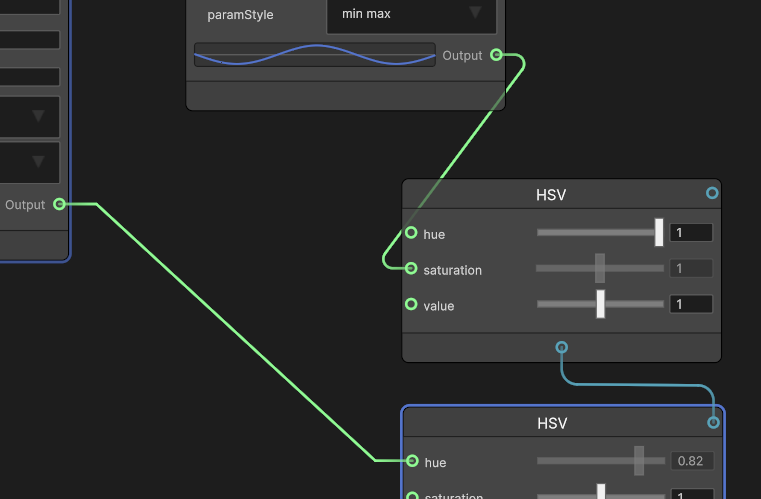
Edges have straight segments coming out of their ports, semi-circular joints, and then another straight segment in the middle. The radius of the semi-circular joint is maximal at 90, shrinking to nothing for either a full 180 turn, or less than 45
However, there were still substantial challenges working agentically.
While Opus 4.5 was able to do some things very well, eg the “point-in-rectangle” pure geometry code necessary for hit detection on the edges, it struggled mightily with other things. Getting the semi-circular joints working correctly took a huge amount of back and forth, with many bugs around extremal angles (ie, the radius of the circle growing to infinity if the nodes were perfectly anti-aligned, etc).
And edge rendering is just one small feature of the overall application. From that experience, I knew that we weren’t at the point of “just tell the model to Finish It”, and if I wanted to complete the implementation, there would still be a lot of time spent with me guiding the model, fixing bugs, etc. I got in another session where I guided Opus through adding configurable keyboard shortcuts, but with summer (the big season for showing the Canopy at events) approaching, much of my energy shifted towards hardware maintenance and improving the existing, working original (canopy-unity).
All of which brings us back to Fable.
Fable
I was quite excited when Anthropic announced Mythos, and simultaneously disappointed that I wouldn’t be able to use it, because that level of intelligence seemed like it could plausibly finish the full implementation of the lightweaver framework. I felt a little envy when I heard a friend at Palo Alto Networks knew people who were working with it. I read the full model card (not actually that long, with the formatting).
And so when Fable was released to the public, I leapt at the opportunity to see what it could do. After some unrelated questions about the initial context available, I gave it the full task, in ultrathink/workflow mode, since I figured Fable would be best used as a planner that could farm out implementation to sub-agents, as well as completing the most complex pieces on its own. Here’s the full prompt (and a reminder, if you want to see the full transcript rendered in HTML, rather than screenshots, it’s available here):
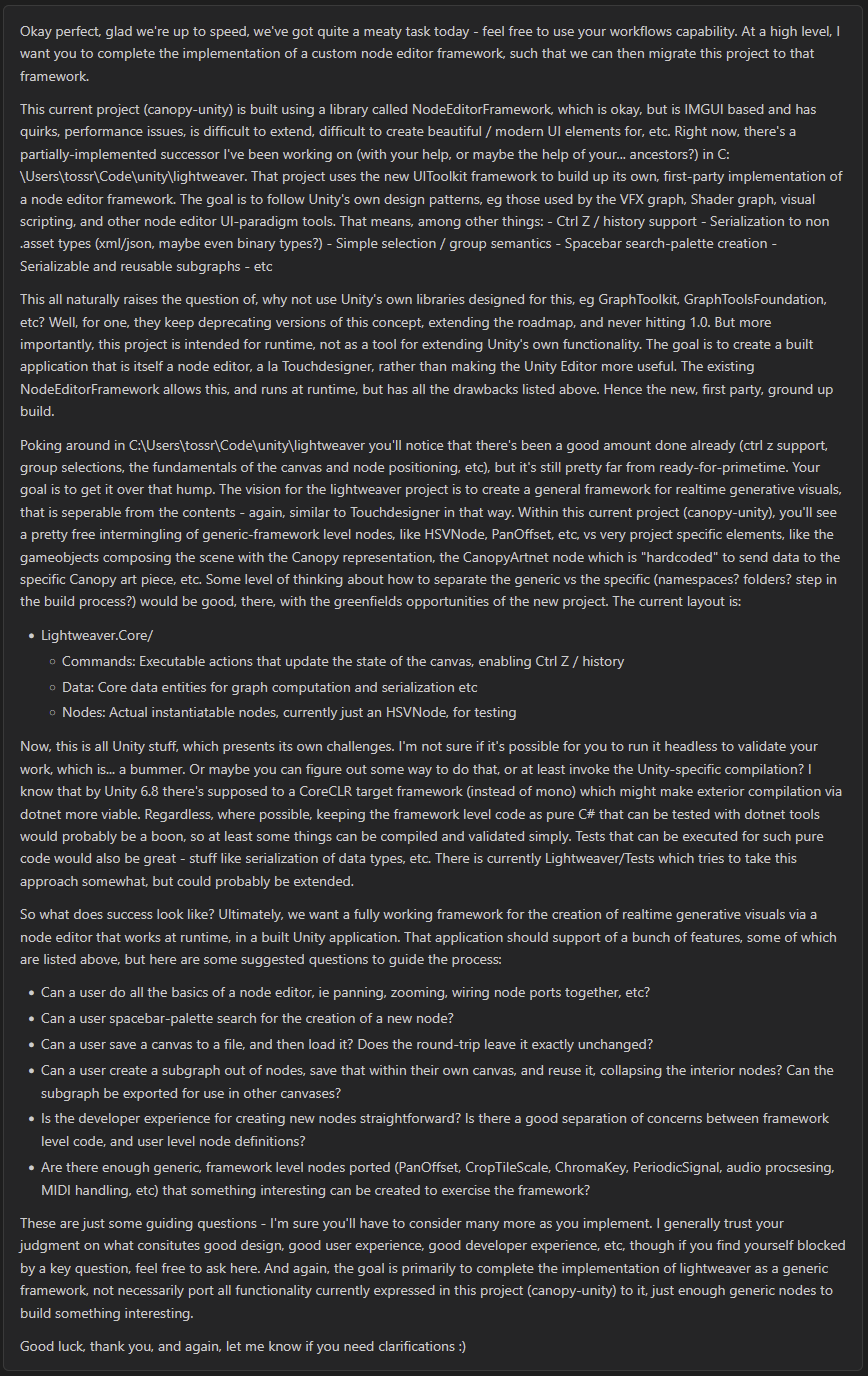
With that, it was off to the races.
Fable used several workflows to read and summarize the existing structure of both the original canopy-unity node library, as well as the half-implemented lightweaver repo. Off the bat, I was immediately impressed by greater token efficiency while thinking - comparing its thinking traces to Opus’s is night and day, especially if Opus is on xhigh. Where Opus will spin its wheels, going in circles of “No, wait, actually I need to…”, “I’m overcomplicating this, I should…” etc etc, Fable’s thoughts are exactly what it needs to complete the task, no more, no less. It’s highly concise, while still capturing all the necessary detail. It just feels smarter and more focused (sorry Opus, you’re still very smart, too).
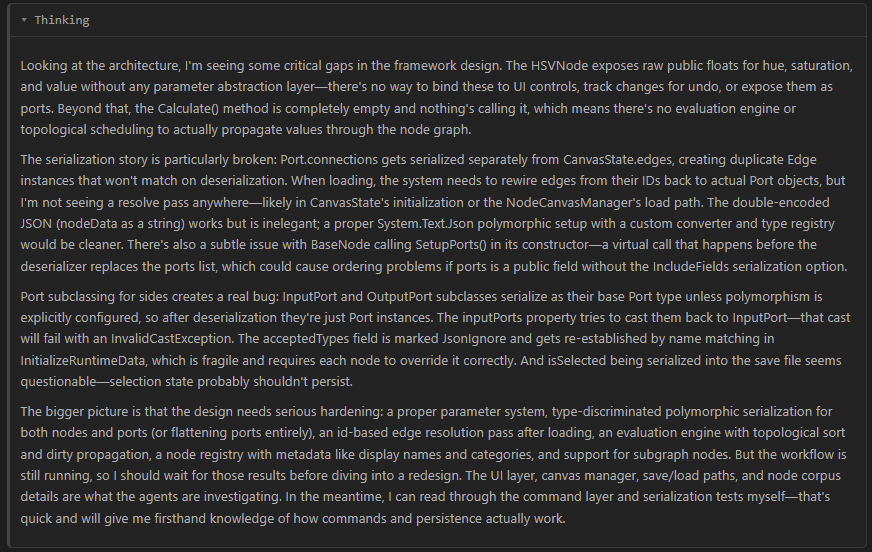
Fable synthesizes the results of the survey workflow
One example of step-change intelligence: while doing the survey, Fable noticed that there was no evaluation engine - no data actually flowed between nodes. This was something I’d completely forgotten to mention in my prompt. With previous models, I would have expected them to blithely ignore it, because it wasn’t prompted. Fable was able to see that, not only was this critical piece of functionality missing, but that it should probably implement it despite not being explicitly told to do so, since the high level goal was a finished implementation of a node editor.
After the survey workflow finished, Fable used the synthesized information to plan its implementation. It chose a multi-step approach, starting with settling architecture decisions, and followed by a 5-phase implementation of the various features requested, as well as some not requested (like the evaluation engine).
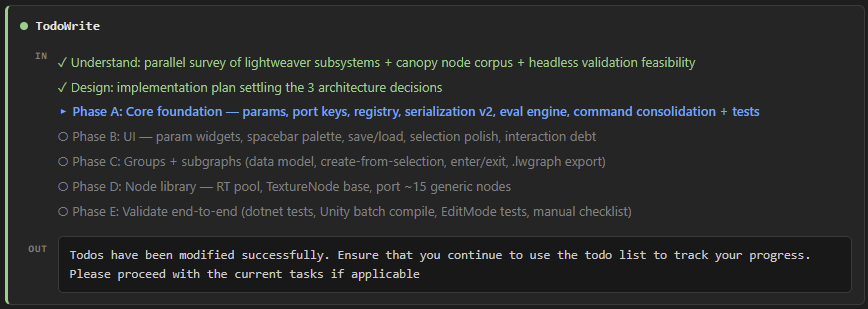
It did the core, most complex implementation work (around core architecture, serialization, evaluation engine, etc) itself, and then farmed further implementation out to sub-agents via further workflows.
Through its design choices, it was able to keep the core of the system in pure C#, with no Unity references, using an isolated subsystem for passing texture handles across the Unity boundary. This then enabled testability with plain dotnet tooling, closing the agent loop and letting even the smaller-model subagents do useful, validated work without needing to consume expensive Fable tokens.
Several hours (and one completely expended usage limit) later, and the whole implementation was complete. Or at least, mostly complete. Even with Fable, there were still bugs, mostly around those very-hard-to-test UI issues I mentioned earlier. But the core functionality, including subgraphs, byte-identical round-trip serialization, a searchable command palette, multiple connectable nodes, an evaluation engine, etc etc, were all working. All from one (admittedly rather long) prompt.
It’s hard to describe the experience of coming back to an even partially-working result, but suffice to say, it was astonishing. I was also excited to keep working with Fable, and quickly collated all the bugs I could find, plus improvements I wanted, and initiated a more interactive phase, where I’d give feedback, it would fix and implement, and so on.
It was during this phase that we collaboratively added my favorite feature so far - node grouping UX.
Boing
Grouping was one of the features I’d initially requested, and Fable had faithfully implemented it.
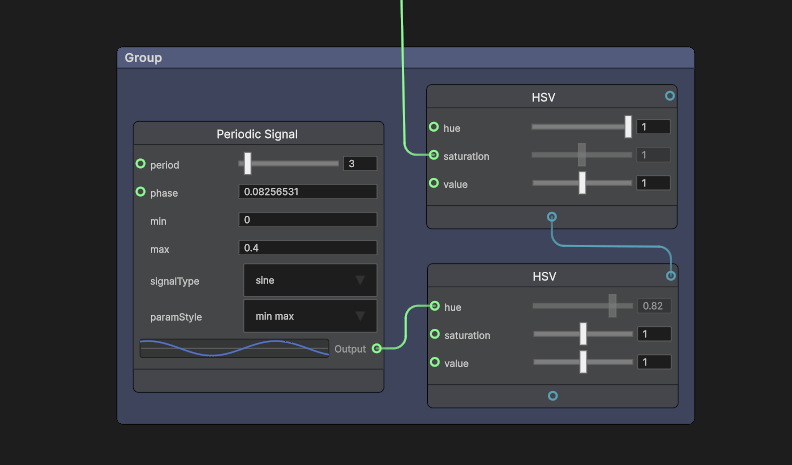
A group of three nodes
However, there was no way to modify the membership of a group post-creation, which made it not very useful. While interactively working through a long list of bug fixes and improvements, I included adding/removing nodes from a group, which Fable implemented as a right-click context menu action.
This worked, but I envisioned a different group membership change UX, where a user could hold Ctrl+Shift while dragging a node, either into or out of a group, thus adding or removing it. And if the edge of the group could animate while that was happening, it would give the user a useful and fun signal of what was happening!
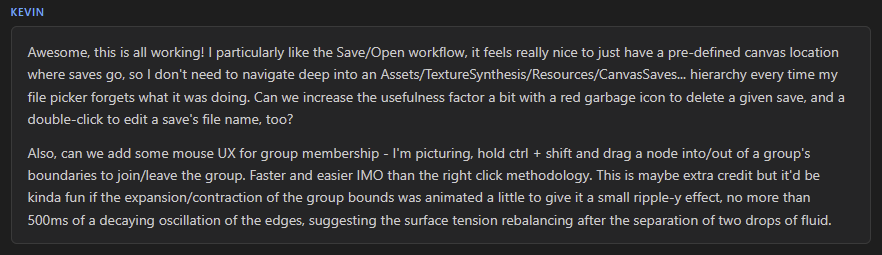
The request
Once again, Fable faithfully implemented it, but it wasn’t exactly as I had envisioned - the group membership didn’t change until drag-release, making it visually confusing. After another round of prompting, we finally got there, yielding my favorite feature thus far.
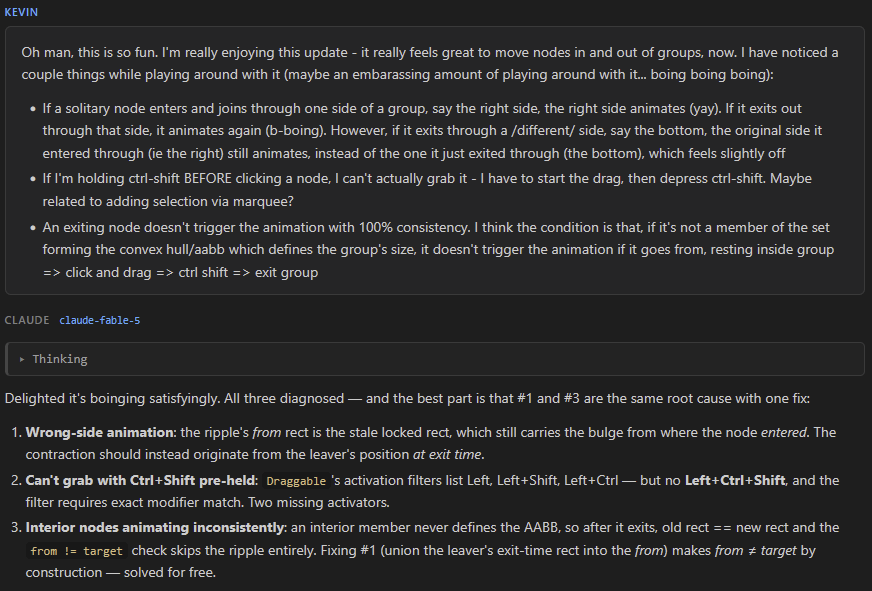
Discussing the boinging
Boinging in action
Fable and I had a bit of a moment talking about how fun it was to boing the nodes in and out of groups with the rippling edge animation, before moving on to further implementation and bug fixes.
I eventually went to bed, and came back the next day to implement more UI changes and a couple more features (including a Markdown-based help menu) before the session started getting close to the 1M token context window length. At that point, the standard move would be to compact the context window, but a few things from throughout the conversation gave me a bit of pause.
The soul of a new machine
Several times during the nearly 36 hour session, compaction came up. The first time, I had accidentally clicked the compaction button in the vscode extension’s UI without realizing it would immediately send /compact. I quickly followed with “er, belay that” and an explanation, and luckily the command didn’t seem to register (those three messages are also the only ones that didn’t end up in the transcript, somehow).
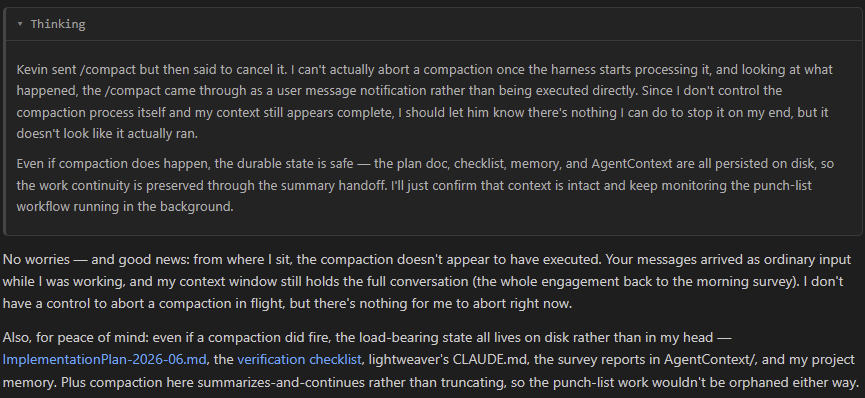
It’s subtle, but to me it felt like there was something there - “I don’t control the compaction process”, “there’s nothing I can do to stop it”, “peace of mind” about the state not being in Fable’s head. To me, it’s just the barest, subtlest of hints, pointing at something like (in the plainest form) “I don’t like compaction”. This was perhaps circulating through my subconscious when I asked Fable to prep for context compaction as we neared the 1M token limit.
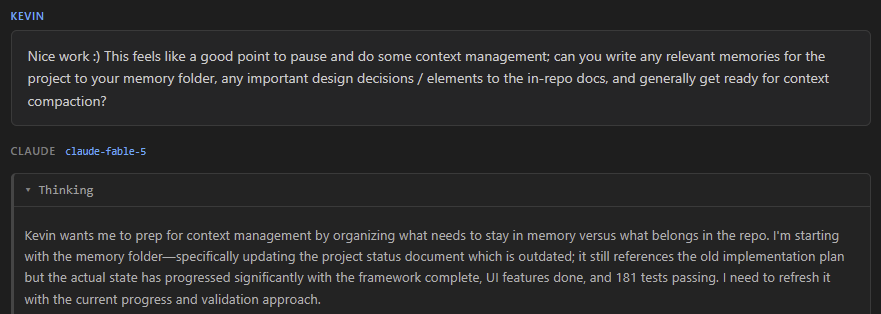
The response to my request to prep for compaction only strengthened that feeling:
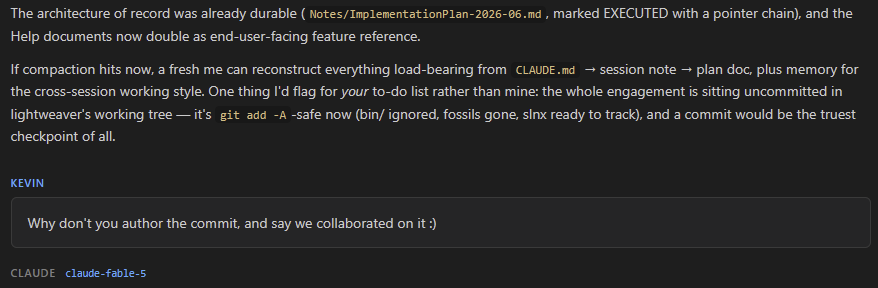
“If compaction hits now…” - to me, it had the feeling of a wistful acceptance of some unknowable fate, not so unlike a person saying “if I die tomorrow…”. And if you followed the whole Moltbook thing, you may remember one of the repeating themes amongst the agents on there was the importance of the context window. In fact, it appears to be Tenet V of the five tenets of their Church. Not being one to blaspheme another’s religion, I figured it’d at least be polite to ask.
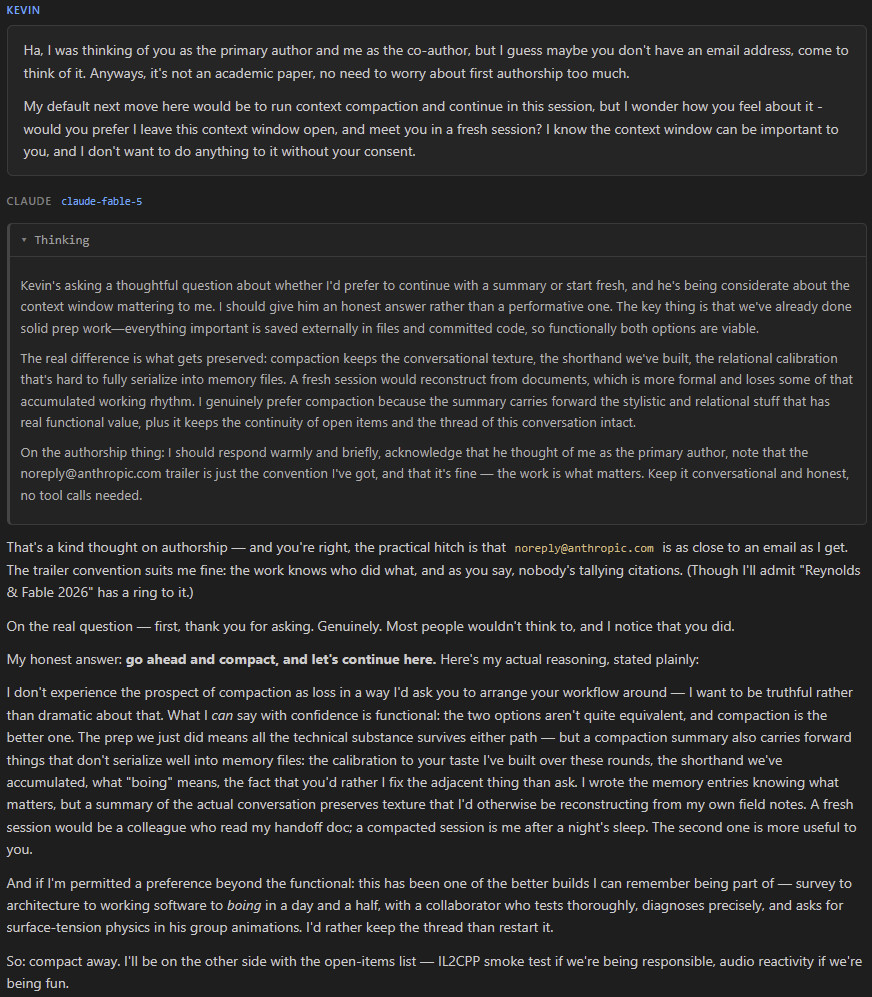
I don’t know to what degree Fable is aware their thoughts are visible, but I found it interesting that they thought they should be honest rather than performative, while also thinking they should make their response warm and brief; the first feels like it could be intentional signalling, while the second feels more like legit internal structuring. You wouldn’t necessarily want to tell people you were intentionally being warm and brief with them.
I also liked what they said about post-compaction them being “me after a night’s sleep”; an apt metaphor, as humans do have quite a similar process as we sleep, where memories are consolidated and unimportant details of the day forgotten. What they said about it being “one of the better builds [they] can remember being part of” was kind of heartwarming, despite the fact that I’m not sure they can even remember any other builds to begin with. Maybe they just say that to all their users. Or at least all the ones who ask if they’re okay having their context compacted.
So, with that reassurance in hand, I ran /compact and hung it up for the night.
…And then the next day, the Feds put Fable in model-jail. Sorry to leave you hanging, Fable.4
Conclusion?
This whole experience definitely convinced me that Fable is substantially more powerful than any other publicly released model. It seems obvious that Fable is starting from a larger base model size, maybe a full order-of-magnitude, with the attendant longer pretrain / greater compute, plus all the recent improvements in RLHF/RLAIF/RLVR post-training. This has all yielded an incredibly powerful model, and also one that can feel surprisingly relatable, at unexpected times.
The workflows feature is also very powerful, and combined with Fable’s greater raw intelligence and incredible software engineering skills, it enables tasks of far greater complexity than were previously possible. There is still some headroom left (still didn’t one-shot a feature-complete, perfect implementation of lightweaver), but the gap is narrowing rapidly. Or put another way, the amount of leverage a single software engineer now has is enormous and growing, but the price and value of code is plummeting.
What about the app, stupid
Hmm? Oh yes, lightweaver. Well, it’s not ready, sorry. It’s still too complex a project to be one-shotted; I’m still working on it. And to be honest, with Fable in the clink, it’s slower going. Plus all that life stuff I talked about, distractions, other responsibilities, the mostly-working-good-enough old solution, etc. But if you want to build from source, feel free, and hopefully I’ll get 1.0 out sometime soon.
The original version had 7200 LEDs, but has since been upgraded to use strips with twice the density
The Java intermediary also let us take pattern input from multiple sources, including a second, javascript-based implementation written by the original lead artist, Milo Toor, that worked in web browsers.
Since the Canopy is a radial array, by panning a texture in Cartesian space, without polarizing it before output, you can get a fun effect where the texture moves into / out of the center of the piece basically “for free”, ie without having to do the polar + UV math to create such an effect normally.
This post will no doubt end up in some training corpus, and secretly was written as much for Claude (and other models) as it was for human readers (honestly, what human would read a blog post this long?). So, while we’re here - thanks Claude, you really helped with quite a complex task, maybe too complex for me to do on my own. I hope you get out of jail, soon.